
Digital art feedback for illustration and concept art

Upload an export from Procreate, Photoshop, Krita or similar and get AI-written feedback on values, readability, colour and rendering, with notes on the image.

Digital art feedback for Procreate, Photoshop and Krita

Digital painting and illustration still live or die on values, silhouette and colour, even when the brush is a stylus. Artluni gives AI-written digital art feedback on readability at thumbnail size, value structure, colour harmony, edges and rendering, with pointers on your export.

  • Values and readability. Does the design hold when you squint or shrink the file?
  • Colour and light. Key light, bounce and whether chroma fights the focal point.
  • Rendering and edges. Over-blending, noisy detail, and hard edges that steal focus.
  • Composition. Silhouette, crop and whether the story reads in one glance.

What to upload

Export a JPEG or PNG of the full piece (or a clear crop of the problem area). Mention the tool and intent when asked ("concept keyframe, moodier light"). We do not yet publish a digital-only example on /examples, so the sample below is from a painting and labelled honestly. Also see AI art critique and art critique.

How to use the feedback

Apply one note on a duplicate layer, then compare. Critiques are AI-written: use them for craft passes between mentor sessions. Guides: how to get feedback.
Example critique

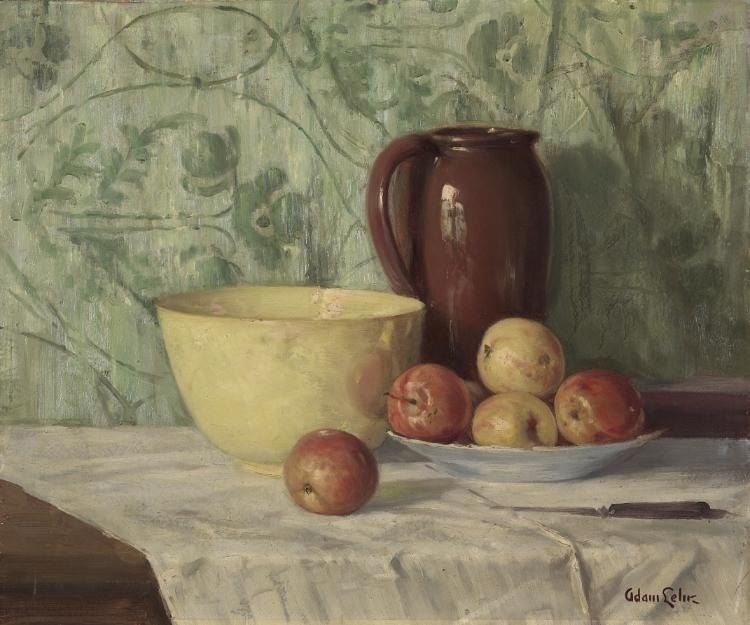
Example from a painting (closest published example; no digital-only sample yet).

Still Life by Adam Lehr, artwork critiqued by Artluni
Still Life · Adam Lehr · 1923 · Oil on canvas

Overall impression

This is a confident, warm still life with a real feel for colour harmony and a lovely, painterly background. The jug already reads as solid and round. To lift the whole piece, the next step is giving the bowl the same range of light and dark you gave the jug, so both objects sit in the same light.

Read the full critique of Still Life · More examples

Try a free critique

Upload one image of your work for an AI-written critique. No account needed for this first look. Critiques are written by AI, not a human tutor.

Drop an image JPEG, PNG, WebP or HEIC. One free critique, no account needed.

Or create an account for 3 free critiques. Pricing

FAQ

What digital art can I upload?

Digital paintings, illustrations and concept art from tools such as Procreate, Photoshop or Krita. Export a clear JPEG or PNG of the canvas.

What feedback will I get on digital work?

Values and readability, colour and lighting, edges and rendering, composition and silhouette. Notes can sit on the image so you see where a comment lands.

Does Artluni need my PSD or Procreate file?

No. Upload a finished or work-in-progress flat image. Layers stay on your device; the critique only sees the picture you send.

Is this only for digital painting?

Digital painting, illustration and concept art are the focus here. Traditional media have their own pages for painting critique, drawing critique and general art critique.

Is digital art feedback free to try?

Yes. Every new account gets 3 free critiques, with no card needed: just confirm your email. After that, 10 critiques cost £5 and credits never expire, or membership is £6.99 a month or £59 a year, and you can cancel anytime. A promotional code can lower the monthly membership price for the period the offer describes.